Affichage des articles dont le libellé est 3d. Afficher tous les articles

26/02/2016

Dreamcatcher V3 integration dans Meteor

in English, at the bottom of this post ;-)

La version hébergée sur Météor n'est plus, préférez la version "Autonome Collaboratif "


Nous en sommes maintenant à la V3 de Dreamcatcher : les plus curieux peuvent déjà y jeter un oeil : http://smag0.meteor.com/

  1.  v1 : http://smag-smag0.rhcloud.com/DreamCatcher/
    1. explications : http://smag0.blogspot.fr/2015/08/dreamcatcher-lattrape-reves.html
    2. Fonctionnalités :
      1. test de la bibliothèque de la bibliothèque traer pour processingjs pour gérer un environnement physique de répulsion, attraction des noeuds, deplacement à la souris, zoom avec les flèches (voir notice/help)
      2. test de drag&drop
      3. test d'integration, export de fichier rdf , n3
      4. sauvegarde de graphe avec touche "s" chargement des données depuis un serveur Fuseki, un sparql endpoint, via une requete sparl ou un service web hebergé ailleurs avec Java/Jena
      5. Creation de sessions pour travailler à plusieurs sur un graphe
    3. utilisationhttp://smag-smag0.rhcloud.com/DreamCatcher/help.html
  2. v2 : http://smag-smag0.rhcloud.com/DreamCatcher1/
    1. explications : http://smag0.blogspot.fr/2015/12/dreamcatcher-ou-comment-partager-des.html
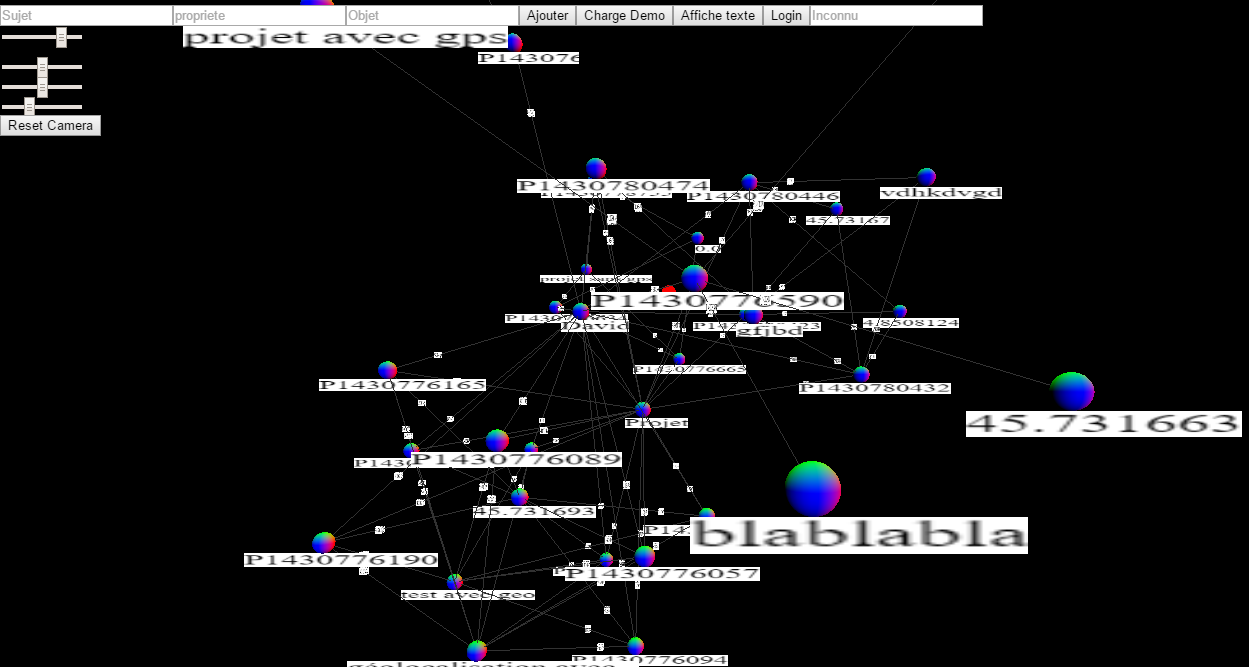
    2. Fonctionnalités : une evolution de la V1, avec prise en charge de la 3D, grâce à P5JS, test égalment avec three.js 
    3. utilisation
      1. cliquer sur "charger Demo" puis sur afficher texte
      2. les curseurs permettent de zoomer, déplacer la caméra
  3. v3 ; http://smag0.meteor.com/
    1. explications : http://smag0.blogspot.fr/2016/02/dreamcatcher-v3-integration-dans-meteor.html
    2. besoin; besoin d'une identification, authentification pour partager, donner des droits sur les graphes, les sessions
    3. dépôt github : https://github.com/scenaristeur/dreamcatcher-smag0
    4. utilisation
      1. en arrivant sur la page d'accueil, on peut s'authentifier, ou créer son compte, 
      2. ensuite on peut créer un post ou participer aux post existants
        1. creer un post : rien de plus simple (attention aux lien, s'il existe déjà, ça empeche de créer le post)
        2. ajouter un triplet ou statement à un post existant, en insérant un sujet, une propriete, et un objet, et en validant. ce triplet/statement devrait s'insérer dans le graphe en haut de page . si aucun graphe n'apparait : revenez sur la page d'accueil, puis actualisez, ( tous les fichiers ne semblent pas encore chargés si on atterit directement sur un post)


version anglaise : 

Dreamcatcher V3 integration in Meteor
We are now in V3 Dreamcatcher: the curious can already have a look: http://smag0.meteor.com/

 v1: http://smag-smag0.rhcloud.com/DreamCatcher/
explanations http://smag0.blogspot.fr/2015/08/dreamcatcher-lattrape-reves.html
features:
test library for the library traer processing.js to manage a physical environment repulsion, attraction knots, displacement mouse, zoom with the mouse (see manual / help)
drag & drop test
integration testing, rdf file export, n3
Backup graph with "s" key data loading from a Fuseki server, endpoint sparql, via a request sparl or a hosted web service elsewhere with Java / Jena
Creation of sessions to work together on a graph
Use: http://smag-smag0.rhcloud.com/DreamCatcher/help.html
v2: http://smag-smag0.rhcloud.com/DreamCatcher1/
explanations http://smag0.blogspot.fr/2015/12/dreamcatcher-ou-comment-partager-des.html
Features: an evolution of the V1, with support of 3D, thanks to P5JS, égalment test Three.js
use :
click "Load Demo" and then display text
sliders allow you to zoom, move the camera
v3; http://smag0.meteor.com/
explanations http://smag0.blogspot.fr/2016/02/dreamcatcher-v3-integration-dans-meteor.html
need; require identification, authentication to share, give rights on graphs, sessions
use :
arriving on the home page, you can authenticate or create an account,
then you can create a post or participate in existing post
create a post: nothing simpler (watch link, if it exists, it prevents creating the post)
add a triplet or statement to an existing post, inserting a subject, a property and an object, and validating. this triplet / statement should be part of the graph to the top. if no graph will appear: return to the home page and then refresh, (all files do not yet appear directly responsible if it lands on a post)

17/12/2015

Superposition des canvas p5.js et three.js : GUI & 3D en javascript

Pour le projet DreamCatcher, j'avais besoin d'un GUI sympa et j'ai opté pour P5.JS, mais il est encore jeune et ne gère pas bien la 3D, ce que fait très bien three.js.


Je me suis inspiré de cet exemple JavaScript : http://codepen.io/velenoise/pen/wabZva .
L'astuce réside dans le CSS de la page index.html : les canvas ont une position absolue, et on gère leur profondeur grâce au z-index.


le cube vert est géré par three.js, alors que le reste : inputbox, bouttons sphère colorée, cube coloré, ellipse jaune et texte sont gérés par P5JS( en 2D ou en 3D, modifiable par la ligne :   var p5js3Dou2D = "3D"; // choix : "3D" ou "2D" : si "3D" --> p5js en 3D, sinon en 2D )

code sketch.js (p5.js)


  var scene, camera, renderer, geometry, material, cube;

  var saisieDiv, inpSujet, inpProp, inpObjet;

  var p5js3Dou2D = "2D"; // choix : "3D" ou "2D" : si "3D" --> p5js en 3D, sinon en 2D


  function setup() {

   if (p5js3Dou2D == "3D") {

    canvas = createCanvas(window.innerWidth, window.innerWidth, WEBGL);

   } else {

    canvas = createCanvas(window.innerWidth, window.innerWidth, 'p2d');

    noSmooth();

   }

   canvas.attribute("id", "defaultCanvas0");

   noStroke();

   saisieDiv = createDiv('');

   saisieDiv.attribute("id", "saisieDiv");

   saisieDiv.position(10, 10);

   inpSujet = createInput('');

   inpSujet.attribute('id', 'inpSujet');

   inpSujet.attribute('placeholder', 'Sujet');

   saisieDiv.child(inpSujet);

   inpProp = createInput('');

   inpProp.attribute('placeholder', 'propriete');

   saisieDiv.child(inpProp);

   inpObjet = createInput('');

   inpObjet.attribute('placeholder', 'Objet');

   saisieDiv.child(inpObjet);

   buttonAjoute = createButton("Ajouter");

   saisieDiv.child(buttonAjoute);

  }


  function draw() {

   if (p5js3Dou2D == "3D") {

    // coordonnees origine : centre du canvas

    push();

    translate(-100, -100, -10);

    sphere(20);

    pop();

    push();

    translate(-300, -200, -20);

    rotateX(frameCount * 0.01);

    rotateY(frameCount * 0.01);

    box(20, 20, 20);

    pop();

   } else {

    // coordonnees absolues depuis coin au gauche

    fill(255, 255, 10);

    ellipse(100, 100, 100, 100);

    fill(255);

    textSize(15);

    textFont("serif");

    text("Ici on est en mode 2D, modifiez la variable 'p5js3Dou2D' dans le code pour passer en 3D", 100, 500);

   }

  }


  function render() {

   cube.rotation.x -= 0.01;

   cube.rotation.y += 0.01;

   requestAnimationFrame(render);

   renderer.render(scene, camera);

  }


  window.addEventListener('load', function() {

   container = document.getElementById('body');

   scene = new THREE.Scene();

   camera = new THREE.PerspectiveCamera(75, window.innerWidth / window.innerHeight, 0.1, 1000);

   camera.position.z = 5;

   geometry = new THREE.BoxGeometry(1, 1, 1);

   material = new THREE.MeshBasicMaterial({

    color: 0x00ff00

   });

   cube = new THREE.Mesh(geometry, material);

   scene.add(camera);

   scene.add(cube);

   renderer = new THREE.WebGLRenderer();

   renderer.setSize(window.innerWidth, window.innerHeight);

   container.appendChild(renderer.domElement);

   render();

  });


--------------------------------------------------------------

code index.html 

--------------------------------------------------------------
<!DOCTYPE html>

<html>


<head>

 <meta charset="UTF-8">

 <title>dreamcatchThreeDi</title>

 <script src="js/three.min.js"></script>

 <script src="libraries/p5.js" type="text/javascript"></script>


 <script src="libraries/p5.dom.js" type="text/javascript"></script>

 <script src="libraries/p5.sound.js" type="text/javascript"></script>


 <script src="sketch.js" type="text/javascript"></script>


 <style>

  body {

   padding: 0;

   margin: 0;

  }


  canvas {

   vertical-align: top;

   position: absolute;

  }


  #container {

   z-index: 2;

  }


  #container canvas {

   z-index: 2;

  }


  #defaultCanvas0 {

   z-index: 10;

  }


  #saisieDiv {

   z-index:15;

  }

 </style>

</head>


<body id='body'>

 <div id="container"></div>

</body>


</html>

12/12/2015

DreamCatcher, ou comment partager des informations avec mes objets connectés, robots, ou partager des projets

Une nouvelle version de http://smag0.blogspot.fr/2015/08/dreamcatcher-lattrape-reves.html est en cours de développement ici : http://smag-smag0.rhcloud.com/DreamCatcher1/

[ v1,v2 ou v3 ? faisons le point sur les versions de Dreamcatcher : http://smag0.blogspot.fr/2016/02/dreamcatcher-v3-integration-dans-meteor.html ]


utilisation de P5js (en français ici : http://fr.flossmanuals.net/p5js-pour-le-webdocumentaire/pourquoi-p5js/) pour créer des graphes RDF


Test avec des graphes en 3D, des curseurs pour déplacer la caméra, zoomer...
Pour tester : cliquez sur le bouton "Charger démo"